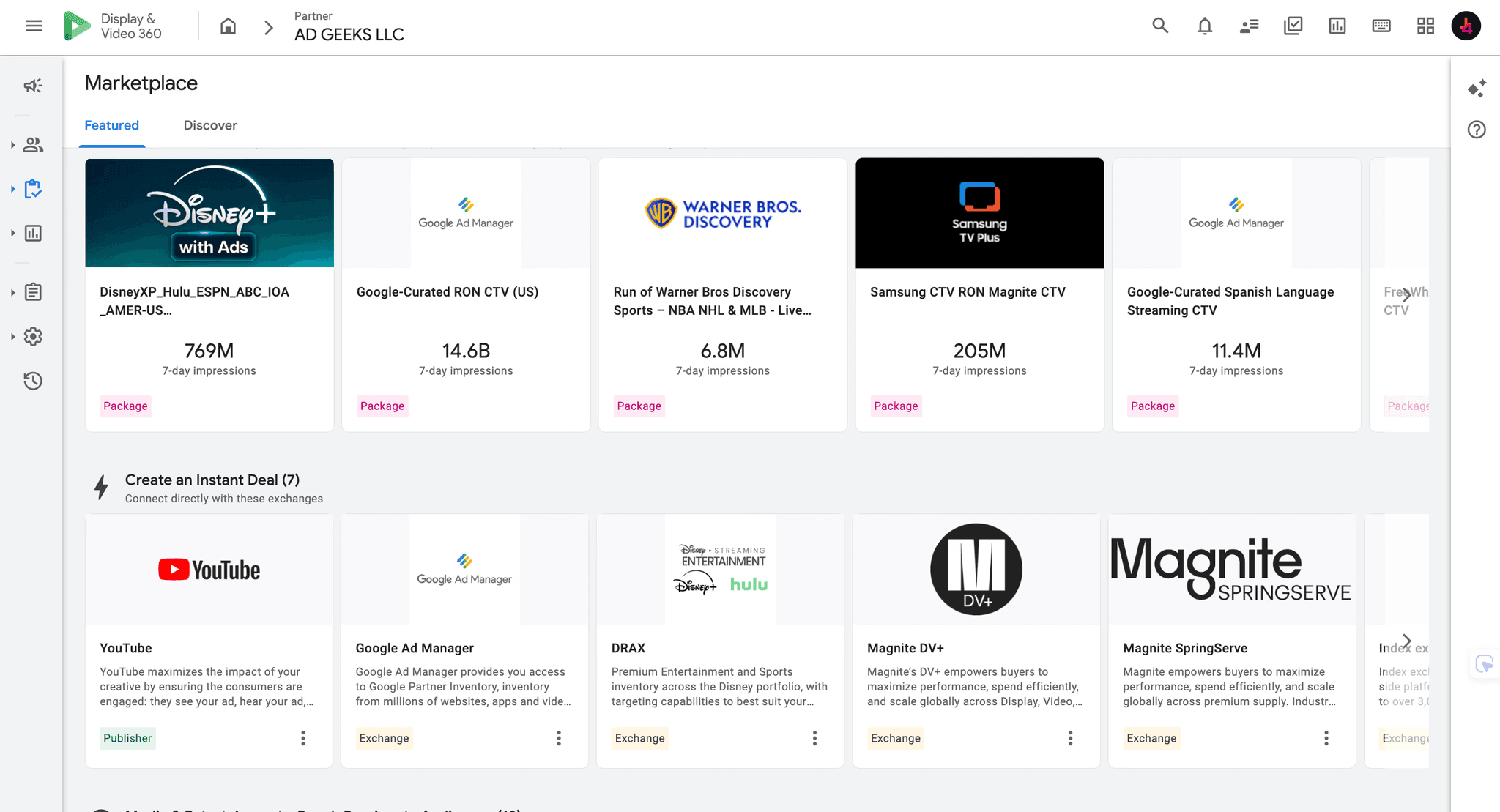
Disney Plus advertising in DV360 is real, but a platform announcement is not the same as a ready-to-launch media plan. Google announced a direct integration between Display & Video 360 and Disney's Real-Time Ad Exchange, or DRAX. The same announcement described reach across Disney+, Hulu and other Disney properties. Current DV360 help documentation also explains the DRAX deal workflow and Disney+ creative approval.
Quick answer: yes, advertisers can buy Disney+ inventory through DV360 using Disney's DRAX supply path, and Google has explicitly positioned the integration as reaching audiences across Hulu and Disney+. However, do not treat either service as universal open-exchange inventory. Before planning, verify the exact DV360 advertiser seat, country, Disney property, deal type, inventory package, targeting rights, creative approval process, measurement fields and commercial terms. Hulu availability should be confirmed in the live Marketplace or written deal because a Disney portfolio connection does not prove that every deal contains Hulu.
The planning rule: confirm the deal, not just the logo. Seeing Disney in DV360 does not prove that your advertiser can buy every Disney+ or Hulu impression in every market.
What is confirmed today
Question | Current answer | What still needs verification
|
|---|---|---|
Does DV360 connect to Disney inventory? | Yes. Google announced a direct DV360 integration with DRAX, Disney's Real-Time Ad Exchange. | Whether the required inventory and transaction type appear for your partner and advertiser seat. |
Can DV360 buy Disney+? | Yes. Google's announcement said Disney+ inventory was open to DV360 advertisers, and current DV360 help pages document Disney+ creative approval on DRAX. | Country, content, device, package, price floor, targeting and forecast for the specific deal. |
Can DV360 buy Hulu? | Google's integration announcement explicitly described reach across Hulu and Disney+ through Disney inventory. | Confirm that Hulu is named in the live package or written deal. Do not infer Hulu entitlement from a generic Disney or DRAX label. |
Is this open auction? | Do not assume so. DV360 documentation describes DRAX deal assignment, Marketplace packages, private deals and instant-deal workflows. | The transaction type - auction package, private marketplace, programmatic guaranteed, instant deal or another negotiated route. |
Can an agency manage it? | Yes, when the agency has an eligible DV360 relationship and can operate or provision the required deal for the advertiser. | Seat ownership, advertiser ownership, data access, management fee, media markup and who retains the deal history. |
How the Disney to DV360 buying route works
DRAX is the exchange layer connecting eligible Disney supply to demand platforms. DV360 is the execution platform. The advertiser typically discovers or receives a Disney opportunity as a Marketplace package, private deal, centrally provisioned deal or supported instant deal, then assigns that inventory to the relevant line item.
That distinction matters. DV360 can be the buying interface while Disney remains the publisher and controls the sell-side terms, inventory definition, audience permissions, creative policy and approval. A DV360 advertiser does not automatically gain unrestricted access to every Disney property by creating a connected TV line item.
Current DV360 documentation says a DRAX creative is submitted for publisher review after a DRAX deal and valid creative are assigned to an active line item. Google recommends submitting at least 72 hours before launch. Approval is handled at the publisher level, and DRAX does not currently support wrapped creatives for pre-registration.
Disney+ access and Hulu access are not interchangeable
Disney owns a broad streaming portfolio, but planning language must identify the service being purchased. A package labeled Disney, DRAX or Disney Streaming may combine properties, devices, content types or audience segments. It may also exclude the exact service a brief requires.
For Disney+, ask for the property name, supported country, ad-supported plan inventory, device mix and content exclusions. For Hulu, require Hulu to appear in the package, proposal or seller confirmation. If a planner cannot show that evidence, classify Hulu as unverified rather than counting it in projected reach.
12 checks to complete before putting Disney+ or Hulu into a plan
1. Confirm the DV360 seat and advertiser eligibility
Ask the operator to search from the exact partner and advertiser level that will run the campaign. Marketplace results can be filtered by the current view level, so access visible in one partner may not appear in another. Save a screenshot or export showing the publisher, package or deal inside the correct advertiser.
2. Confirm the target market
Streaming ad products vary by country. Confirm that the ad-supported service, DRAX supply and requested targeting are available in every market on the media plan. A US confirmation should never be reused as proof of access in another country.
3. Name the Disney property in writing
Require the seller or seat operator to state whether the deal contains Disney+, Hulu or both. Also ask whether other Disney properties are blended into the forecast. This prevents a broad Disney portfolio forecast from being reported as service-specific reach.
4. Identify the transaction type
Record whether the buy is a private auction, preferred deal, programmatic guaranteed reservation, instant deal or another package. The transaction type affects price certainty, delivery commitment, forecast reliability, frequency behavior and cancellation terms.
5. Verify the supply path and seller
The deal should identify DRAX as the exchange when that is the intended route. Capture the deal ID, publisher or seller name, exchange, inventory description and seller contact. Avoid treating an app name or generic CTV bundle as proof of direct Disney supply.
6. Check what inventory is included
Ask whether the deal covers on-demand programming, live streams, sports, specific genres, sponsorships or a broad run-of-service pool. Confirm device types and whether delivery is limited to connected TV screens or can include mobile and web video.
7. Validate audience permissions
Separate Google audiences, Disney contextual or audience segments, advertiser first-party data and any PAIR-based activation. Availability can vary by market, deal and policy. Do not assume every audience named in the integration announcement is enabled for every campaign.
8. Build a realistic forecast
Use the exact geography, dates, audience, frequency cap, creative duration and deal. Review available impressions, unique reach where supplied, price and win assumptions. A publisher-level availability number without deal and audience filters is not a campaign forecast.
9. Define frequency control
DV360 supports frequency caps across connected TV inventory when supported identifiers or modeling are available. That does not make household deduplication perfect. For guaranteed deals, delivery commitments can also affect how higher-level caps behave. Document the cap level, time window and expected limitations before launch.
10. Confirm measurement and reporting
List the fields the advertiser will actually receive: impressions, spend, completion rate, reach, frequency, app or URL, deal, exchange, audience, geography and conversion or lift outputs. Ask which metrics come from DV360, Disney or a third party. Do not promise show-level reporting, log-level data or cross-publisher deduplication unless the agreement explicitly provides it.
11. Preflight the creative
Google recommends MP4 creative for CTV and says publisher specifications still apply. For DRAX, assign the deal and creative to an active line item so publisher review can begin. Submit at least 72 hours before launch, leave time for a rejection and avoid unsupported wrapping. Confirm duration, audio, bitrate, aspect ratio, click behavior and legal requirements against the current Disney media kit.
12. Normalize the commercial terms
Separate working media from the DSP fee, partner fee, managed-service fee, data charges, creative serving, measurement and any markup. Compare options on the same basis. A lower quoted CPM can become the more expensive route when mandatory fees are excluded from the headline rate.
Ad Geeks can verify the current DV360 route, inspect deal availability and turn the result into a launchable media plan.
What a valid access confirmation should include
Field | Evidence to retain |
|---|---|
DV360 account | Partner ID, advertiser ID and the team that controls them |
Publisher and service | Disney+, Hulu or both, written in the package or seller confirmation |
Supply route | DRAX exchange, deal ID and seller name |
Market | Eligible countries and language or regional restrictions |
Transaction | Private auction, preferred, guaranteed, instant or other route |
Inventory | Devices, content types, live or on-demand inclusion, and exclusions |
Economics | CPM or floor, minimum, commitment, cancellation and every added fee |
Targeting | Approved Google, Disney and advertiser-data options |
Measurement | Reportable fields, attribution method, lift options and data ownership |
Creative | Current spec sheet, review status, deadline and rejection remedy |
When managed service makes sense
A managed-service partner is useful when the advertiser does not have a suitable DV360 relationship, cannot find the relevant Disney deal, needs help negotiating terms or wants one team to handle forecasting, trafficking, publisher approval and reporting. The value should be operational and verifiable, not a vague claim of exclusive inventory.
Before appointing a partner, ask who owns the DV360 advertiser, who can export raw reports, whether the Disney deal remains available if the relationship ends, and how every fee is calculated. The advertiser should receive the same access evidence listed above, even when the agency handles execution.
Common planning mistakes
Counting Disney+ and Hulu from one generic Disney forecast. Require service-level confirmation.
Assuming direct integration means open exchange. Verify the live deal and transaction type.
Using a publisher logo as proof of seat access. Search from the exact advertiser that will buy.
Ignoring creative review time. DRAX pre-registration should begin at least 72 hours before launch.
Promising perfect frequency control. Explain identifier, modeling and guaranteed-delivery limitations.
Comparing CPMs before fees. Normalize all platform, data and managed-service costs.
How Ad Geeks verifies Disney Plus advertising in DV360
Ad Geeks checks the live DV360 partner and advertiser, confirms the Disney property and DRAX route, records the deal terms, forecasts the actual target and preflights the creative. If Hulu is not named in the deal, we do not count it. If measurement is unavailable, we do not imply it. The result is a plan built from executable access rather than a press release.
Continue with our streaming TV media plan across Disney+, Netflix, Prime Video and YouTube, CTV direct IO vs PMP vs open auction guide, and CTV agency evaluation checklist.
We can verify Disney+ and Hulu buying routes, manage DV360 execution and document the measurement plan before spend begins.
Frequently asked questions
Can you buy Disney+ ads through DV360?
Yes. DV360 connects directly to Disney's DRAX exchange, and current Google documentation describes Disney+ creative approval for DRAX deals. The advertiser should still verify country, seat, deal, inventory, price and targeting before planning.
Can you buy Hulu ads through DV360?
Google's DRAX integration announcement says advertisers can reach audiences across Hulu and Disney+. Hulu should still be named in the live Marketplace package, proposal or written deal before its reach is included in a plan.
Is Disney+ available in the DV360 open auction?
Do not assume universal open-auction access. Current documentation points to DRAX deals, packages, private deals and instant-deal workflows. Confirm the exact transaction type in the advertiser seat.
How long does Disney creative approval take in DV360?
Google recommends submitting DRAX CTV creative at least 72 hours before launch. Build extra time for rejection, revision and resubmission.
Can Google audiences be used on Disney inventory?
Google announced broad availability of Google audience segments across Disney's portfolio, but actual eligibility can vary by market, policy and deal. Verify the available targeting options inside the live advertiser and package.
Do I need an agency to buy Disney+ through DV360?
Not always. Advertisers with an eligible DV360 relationship and the required deal may operate directly. A managed-service partner can help with access, negotiation, trafficking, approval and reporting when those capabilities are missing internally.
Official sources
Google, Maximize CTV performance with Display & Video 360 and Disney.
Google Display & Video 360 Help, Disney Real-Time Ad Exchange pre-registration for Connected TV creatives.
Google Display & Video 360 Help, Connected TV creatives.
Google Display & Video 360 Help, Marketplace overview.
Google Display & Video 360 Help, Instant deals.
Google Display & Video 360 Help, Create Connected TV line items.
Google Display & Video 360 Help, Manage frequency with frequency caps.
Disney Advertising, Advertising sales media kits.